
Updated on
You can find the address of your podcast as follows:
- Go to: https://www.podcastfeed.app/channel (and log in if you were not logged in yet)
- Now you see an overview of all your podcast channels.
Click the orange icon next to the podcast you want
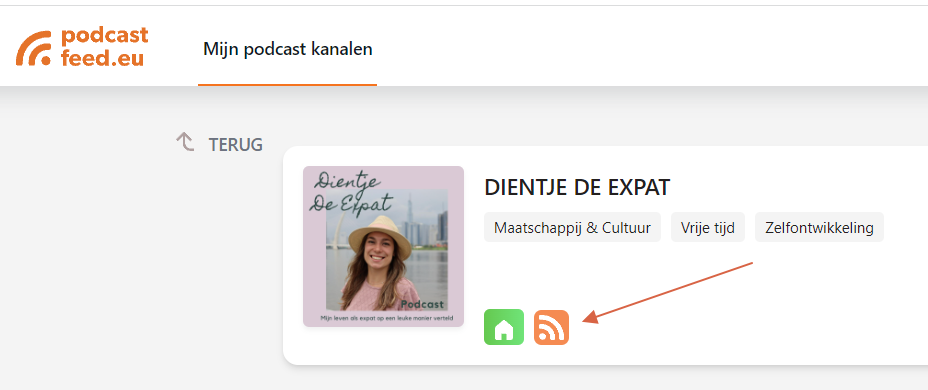
- Your browser opens a new window
- In the address bar you see the address of your RSS feed (up to and including feed.xml)
- Copy the address up to and including feed.xml
- You can then paste it into other platforms that ask for the address of your podcast.
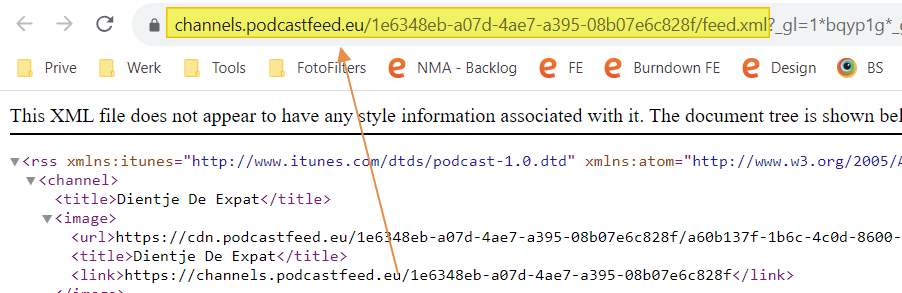
The address of your podcast RSS feed will not change. You get an RSS feed for every channel you create.
The RSS feed may look strange in your browser: what you see is XML, a format that is handy for exchanging data between computers and software.
The RSS feed contains things like:
- The name of your podcast
- The title of a podcast episode
- The episode description
- The image per episode
The date the episode was added
That way other platforms can import your podcast easily and pick up new episodes automatically as soon as you have added one.